Content Hub — evolving Birdeye Social from a scheduler into a content operation
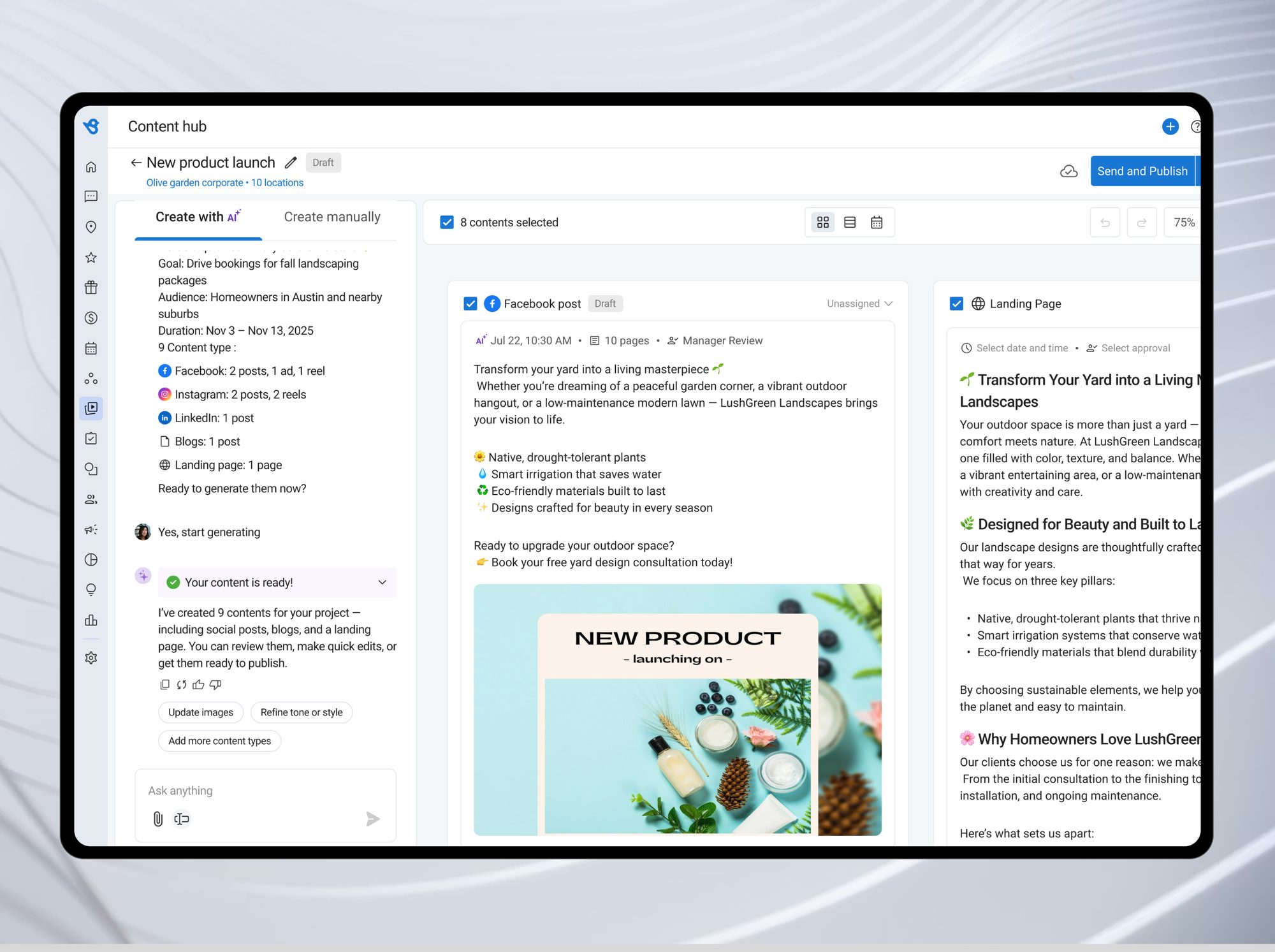
Context
I owned design for Birdeye Social — the platform’s second-highest revenue product.
Publishing, engagement, reporting, and approvals across 10,000+ business locations — 175k posts published every month. Social had grown into a serious scheduler. Content Hub was the strategic bet to evolve it further: from scheduling content to creating it.
Problem
The person posting for a 500-location brand is usually a front desk manager — not a content team.
“I know I need to post, but by the time I sit down to write something, it’s already Thursday.”
Regional Marketing Manager, multi-location dental groupBlank canvas paralysis
Five platforms, five formats, no starting point.
No brand consistency
Every location posted its own tone, visuals, and CTAs.
Approvals over iMessage
No record, no versions, no way to catch a bad post before it hit 500 pages.
Key decision — 01 · AI brief
A guided conversation, not a blank form.
A form recreated the blank-canvas problem we were solving. The AI asks one question at a time, offers chips for common goals, and assembles the structured brief in the background.
Tradeoff:power users wanted all fields at once — a “Create manually” tab stayed as the escape hatch.
Key decision — 02 · Content canvas
One brief becomes a whole campaign — posts, blog, emails, landing page.
Each output auto-adapts to its platform — teams review and publish instead of writing.
Tradeoff: generating everything upfront creates review overhead — solved with per-piece assignees, due dates, and one approval queue.
Key decision — 03 · Approvals
Structured approvals replaced text-message sign-offs.
Every approval action is tracked — a clear record of who approved what, when.
Tradeoff: managers who just want Approve/Reject get a one-row bulk queue; the comment thread sits underneath for teams that need it.
Key decision — 04 · Publishing
The calendar closes the loop — and AI picks the publish time.
BirdAI pre-fills the optimal publish timefrom past engagement per channel. Teams can override it; most don’t.
Tradeoff: calendar is one of three equal views, not the default — single-location teams stay in the grid.
Also shipped
Six features that emerged from post-launch customer feedback.
Version history
Every edit tracked; one-click restore.
Share & access control
Location-scoped project links.
Activity log
Project-level audit trail.
Content library
Templates organized by goal, not blank canvas.
Assigned to me
A personal queue with due dates.
Export
Posts as ZIP; blogs & pages as HTML.
Outcome & reflection
One of Birdeye’s most adopted AI features at launch.
Businesses that posted once or twice a month began publishing consistently. Approvals moved inside the product, and franchise operators finally got publishing visibility.
What I’d push harder next time: brand templates — pre-approved voice and tone guardrails for AI content. And the audit trail (version history, activity log) should have shipped day one — teams across 10 locations need it from the start.
The surprise:“Assigned to Me.” Designing for the individual inside the team — not just the team — is a pattern I’d carry into any collaboration product.